AI creation
Make a character that is yours
Describe an original mascot or upload your own reference. One generation creates 12 expressions and a complete platform ZIP.
30 credits / set
Explore AI Studio →Original characters. One complete emote set.
Create a custom 12-expression set with AI, choose a finished mascot pack, or resize artwork you already have. Get the right files for your channel—not just one image.
AI credits from $9.90 · finished packs $4.95 · no subscription required
Already have artwork? Use the free resizer ↓One character. All 12 chat reactions.
Capybara · 12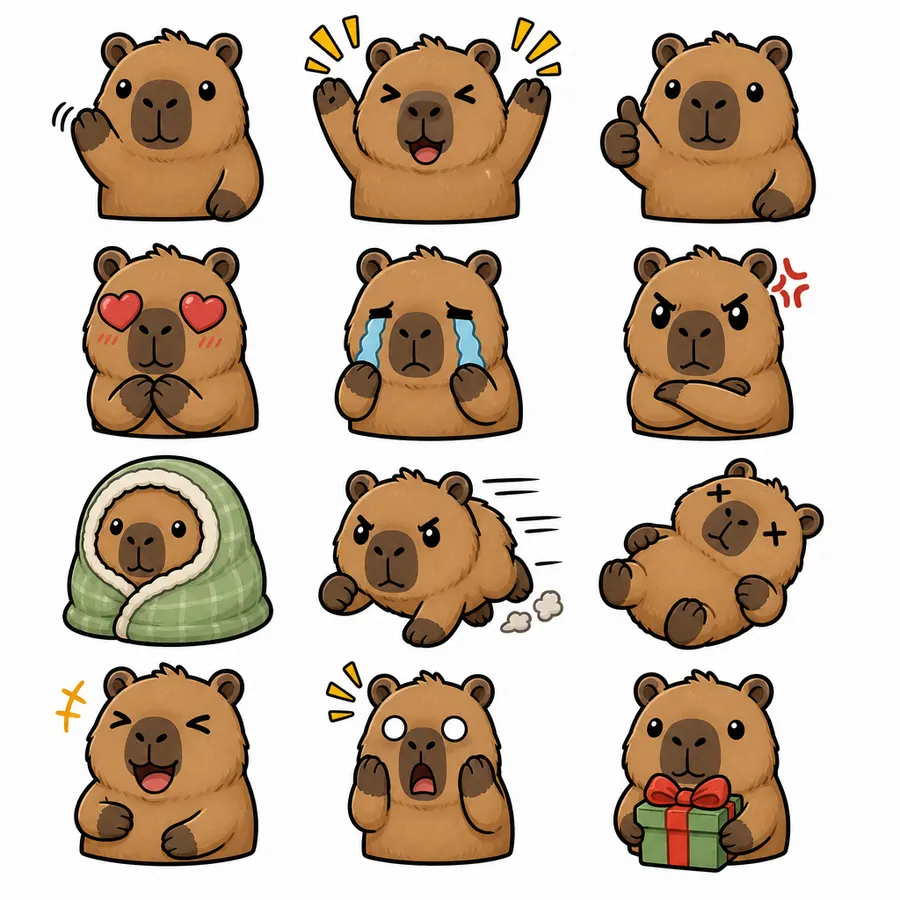
Finished Capybara pack preview—not a guaranteed AI result. Your AI set is generated from your own prompt or reference.
AI creation
Describe an original mascot or upload your own reference. One generation creates 12 expressions and a complete platform ZIP.
30 credits / set
Explore AI Studio →Ready-made packs
Preview every expression before buying. Get transparent PNGs, simple-motion GIFs, platform sizes and upload notes.
$4.95 / complete pack
Find my mascot →Free creator tools
Resize your own PNGs and GIFs in your browser. No account, no payment and no upload to our server.
Free
Resize my artwork →ปรับขนาด Emote ของ Twitch เป็น 112x112, 56x56, 28x28 ทันที ฟรี 100% รองรับ GIF เคลื่อนไหว ทำงานในเบราว์เซอร์ของคุณ
วาง Emote ของคุณที่นี่ (สูงสุด 5 รายการ)
หรือ คลิกเพื่อเลือกไฟล์
PNG JPG GIF WebP
เคล็ดลับ: เพื่อผลลัพธ์ที่ดีที่สุด อัปโหลดรูปภาพอย่างน้อย 112x112 พิกเซล
อัปโหลดได้สูงสุด 5 emote พร้อมกัน! รูปภาพทั้งหมดถูกประมวลผลในเบราว์เซอร์ของคุณ
These are real finished packs from the gallery. Open one to see all 12 expressions and every included file.
12 expressions, transparent PNGs, simple-motion GIF exports, six badge expressions and README / license notes. Re-download owned packs without spending credits again.
28 / 56 / 112px PNG
128px PNG
48px PNG
28 / 56 / 112px GIF
18 / 36 / 72px PNG
512px PNG + README
The $9.90 starter pack gives you 5 custom 12-expression sets. Buy more only when you want to create more.
ยินดีต้อนรับสู่เครื่องมือปรับขนาดอิโมจิ Twitch ฟรีสำหรับสตรีมเมอร์
ทุกฟีเจอร์ฟรี ประมวลผลอิโมจิได้ไม่จำกัด
ทุกอย่างประมวลผลในเบราว์เซอร์ของคุณท้องถิ่น
ไม่ต้องดาวน์โหลด ไม่ต้องสร้างบัญชี
สอดคล้องกับข้อกำหนดที่เข้มงวดของ Twitch โดยอัตโนมัติ
ทำความเข้าใจข้อกำหนดขนาด Twitch
ปรับขนาดเป็น 28x28 (1x)
ปรับขนาดเป็น 56x56 (2x)
ปรับขนาดเป็น 112x112 (3x)
เริ่มต้นด้วยพื้นที่อย่างน้อย 224x224 พิกเซล
รองรับ PNG, JPG, GIF, WebP สูงสุด 5 อิโมจิต่อครั้ง
ดูว่าอิโมจิของคุณจะมีลักษณะอย่างไรในแต่ละขนาด
ใช้การอัปโหลดด้วยตนเองโดยไม่มีชุด 28x28, 56x56 และ 112x112 ครบถ้วน
ใช้รูปภาพที่ไม่เป็นสี่เหลี่ยมจตุรัส
เกินขีดจำกัดขนาดไฟล์ 1MB
ใช้การออกแบบที่ซับซ้อนเกินไป
เตรียมรูปภาพและไฟล์สำหรับแต่ละแพลตฟอร์มได้โดยตรงในเบราว์เซอร์
เครื่องมือ Twitch
Twitch GIF Emote Maker: Twitch GIF Emote Maker.
เครื่องมือ Twitch
Twitch แบดจ์ เครื่องมือปรับขนาด: 18×18 แบดจ์, 36×36 แบดจ์, 72×72 แบดจ์.
เครื่องมือ Twitch
Twitch ไอคอนแต้มช่อง เครื่องมือปรับขนาด: 28×28 ไอคอนแต้มช่อง, 56×56 ไอคอนแต้มช่อง, 112×112 ไอคอนแต้มช่อง.
เครื่องมือ Twitch
Twitch รูปโปรไฟล์ เครื่องมือปรับขนาด: 256×256 รูปโปรไฟล์.
เครื่องมือ Twitch
Twitch แบนเนอร์ เครื่องมือปรับขนาด: 1200×480 แบนเนอร์.
เครื่องมือ Twitch
Twitch พาเนล เครื่องมือปรับขนาด: 320×160 พาเนล.
เครื่องมือ Twitch
Twitch หน้าจอออฟไลน์ เครื่องมือปรับขนาด: 1920×1080 หน้าจอออฟไลน์.
เครื่องมือ Twitch
Twitch โอเวอร์เลย์ เครื่องมือปรับขนาด: 1920×1080 โอเวอร์เลย์.
Twitch แสดงอีโมตที่ 28x28, 56x56 และ 112x112 โหมดอัตโนมัติรับภาพสี่เหลี่ยมหนึ่งไฟล์ ส่วนโหมดด้วยตนเองใช้สามไฟล์
28x28 (เล็ก/1x), 56x56 (กลาง/2x), 112x112 (ใหญ่/3x) ต้องเป็นสี่เหลี่ยมจัตุรัส 1:1
ได้! รองรับ GIF เคลื่อนไหวเต็มรูปแบบ
ใช่ ฟรี 100%